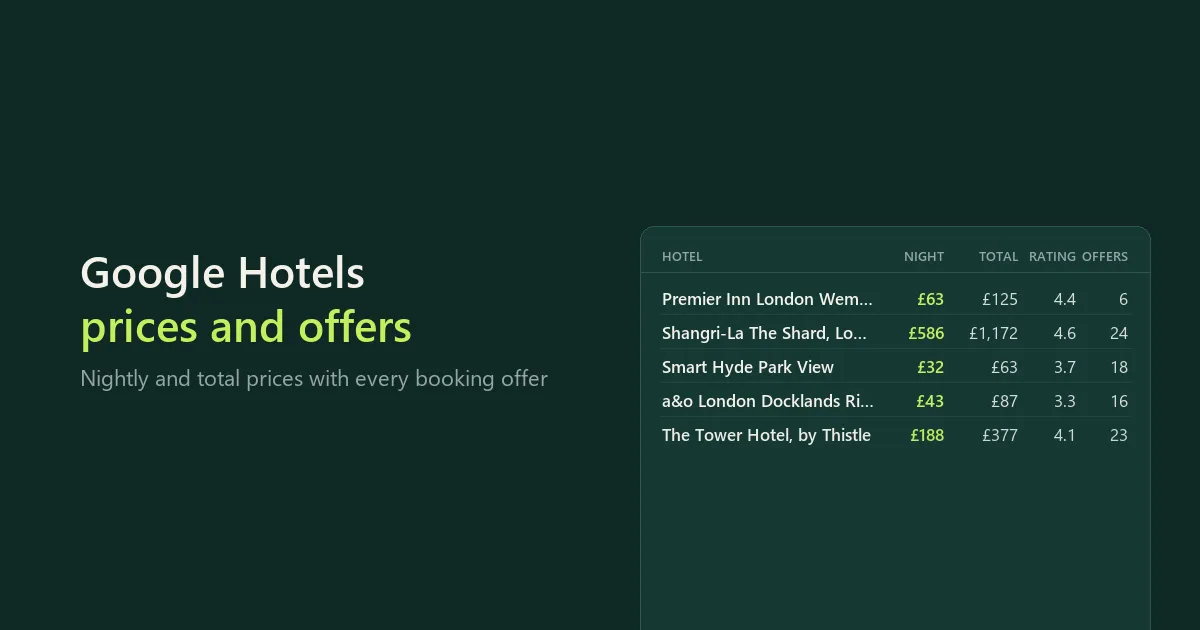
Collect hotel prices for a specific stay, together with the organic booking offers available through Google Hotels, part of Google Travel. Each result identifies the property, dates, guest count and currency, so you can use it in a spreadsheet or your own price-monitoring workflow. This is an independent tool, maintained by CleanScrape.
The main form shows the destination, stay preset, nights, adults, currency and Maximum hotels. Open Specific hotels or dates (optional) for property links or exact check-in and check-out dates.
Try a small example
Suppose you are comparing accommodation in London for a two-night trip next month. The form opens with this search, so you can start it as it is.
- Keep
hotels in London under Place or hotel searches, or enter your own destination.
- Keep In 30 days, 2 nights, 2 adults and British pound, or change them.
- Leave Maximum hotels at 5 and start the run.
- Open the run's dataset: each row is a hotel with its headline nightly and stay prices and an
offers list of booking-site quotes. Download JSON to keep the offers nested, or CSV and Excel for a flat table.
- Read the
RUN_REPORT record (JSON) in the run's key-value store alongside the results. It explains source errors, filtering and coverage limits.
For exact properties, clear the search and paste Google Hotels links under Hotel links. You can also keep both inputs to combine discovery with specific properties. The Actor checks that the returned property ID matches. If Google substitutes an unrelated place for an explicit search such as hotels in London, that search is skipped with an explanation rather than exporting the substituted hotels.
{
  "queries": ["hotels in London"],
  "datePreset": "in_30_days",
  "nights": 2,
  "currency": "GBP",
  "adults": 2,
  "maxResults": 5
}
Compare hotel prices for the same stay
Open a property in Google Hotels and copy its property-page link. Paste one link per entry under Hotel links (optional). Set the dates, adults and currency in this form; values in a pasted link do not replace those settings.
{
  "queries": [],
  "hotelUrls": [
    "https://www.google.com/travel/hotels/entity/ChUI3_-FnbCxhLlLGgkvbS8wNmNna3EQAQ/prices"
  ],
  "datePreset": "in_30_days",
  "nights": 2,
  "adults": 2,
  "currency": "GBP",
  "maxResults": 1
}
Availability and quotes change. Use your own property link for your comparison.
Dates without manual formatting
Use tomorrow, next Friday, in seven days or in thirty days. Presets are calculated from the run's UTC date and work with schedules: each scheduled run checks a stay that far ahead. For a fixed trip, choose Choose exact dates and set a check-in date (and optionally a check-out date) under Specific hotels or dates (optional). Explicit dates take precedence over a preset.
The Actor supports one room and 1-6 adults. Children, several rooms and date grids are not supported yet. It does not silently ignore unsupported input fields.
What you receive
One dataset row is one property and stay, including its organic booking-site offers. Dates, currency, adult count and property identity must pass source checks before a row is saved.
| Field | Meaning |
|---|
name, hotelId, googleHotelsUrl | Property identity and a link with the requested stay |
checkIn, checkOut, nights, adults, currency | Source-verified stay context |
nightlyPrice, totalPrice | Google's displayed headline amounts, kept separately |
offers | Organic booking-site quotes, amounts, terms and Google booking links |
offerCount, offersStatus, warnings | Coverage and relevant limitations |
rating, reviewCount, address | Property information when the source supplies it |
verification, fetchedAt, recordKey | Quality checks, collection time and a stable property/stay key |
The stay total is not calculated by multiplying a rounded nightly price. Booking-site quotes can differ from Google's headline offer. A missing field means it was not available in the source, not that the property lacks that feature.
A scheduled run collects a fresh snapshot each time; compare recordKey across runs to follow a hotel's price over time.
Comparing prices responsibly
A cheaper offer may be a dorm bed rather than a private room, or have different cancellation and meal terms. Room equivalence is not verified. The lowest observed provider is not a rate-parity finding or a guarantee of the cheapest equivalent booking. taxesIncludedInHeadline is currently null: do not assume taxes or local charges are included.
Booking links can expire, and checkout prices can change. The Actor does not open booking sites, make reservations or verify checkout availability. It does not return paid advertising placements as organic offers.
Coverage and limits
- Up to 20 properties from the first results page per place search. It is not a complete city export.
- Maximum hotels is a run-wide upper limit, not a promise of that many available prices.
- Rating filtering happens after lookup, so a strict filter can give fewer results.
- Offers per hotel are bounded by Booking-site offers per hotel.
- A source block stops the workflow. No captcha solving or automatic residential fallback is included.
- Direct requests and the datacenter proxy are the supported connections. Custom proxy URLs and residential groups are rejected rather than silently ignored.
- A failed lookup or missing quote does not mean a hotel is sold out. Diagnostics go in the run report, not in made-up price rows.
Pricing
$15 a month to rent it, after a 7-day free trial, long enough to follow a week of daily prices. Cancel at any time; access runs to the end of the month you paid for.
Runs use compute, paid from your Bytewells credit at Bytewells' rates, separately from the rental. No proxy is used by default. In tests on Bytewells, 5 London hotels used $0.0008 of credit, 8 Lisbon hotels $0.0007, and 10 hotels in Vienna and Barcelona $0.0011.
There is no charge per hotel or per offer, so daily price checks of many hotels cost the same rental.
Use it from the API
The Actor runs through the Bytewells API, which works with Apify's API clients: point the client's base URL at Bytewells (see Bytewells docs) and call cleanscrape/google-hotels-scraper with an input from the examples above. The hotels are in the run's default dataset; RUN_REPORT is a JSON record in its key-value store.
Common questions
Is there a Google Hotels API?
Google offers hotel APIs to hotels and booking partners for their own listings, not a public API for comparing other hotels' prices. This Actor reads Google Hotels pages.
What does a run cost on top of the rental?
Only the compute it uses, from your Bytewells credit. Test runs used $0.0007 to $0.0011 each.
Why did a hotel have no price?
Google showed no verified price for that stay, the dates or currency did not match, or the hotel had no offers. The run report gives the reason per hotel.
Support and independence
CleanScrape maintains this Actor and updates it when Google changes its pages. If something looks wrong, email [email protected] with the run ID and a short description. Never send API tokens.
This Actor is not affiliated with, endorsed by, or sponsored by Google or the hotels and booking sites in its output. Trademarks belong to their owners and are used only to identify the source.
More tools from CleanScrape
- Google Trends Scraper API for Interest Over Time: search interest over time, by region, related queries and trending searches
- Economic Calendar API for Official Release Dates: release dates and times for CPI, jobs, GDP and central bank decisions in five economies
- Career Page Jobs Scraper for Workday, Greenhouse and Lever: open jobs from company career pages, with salaries and new or closed jobs
- Whatnot Scraper for Listings and Live Shows: Whatnot listings with prices and sellers, live shows, and alerts for new listings
- Whatnot Seller Tracker for Top Sellers and Sales: top Whatnot sellers per category, items sold, sales per day and followers over time
- Google Flights Scraper and Fare Tracker: flight prices, airlines, stops and times for your routes and dates, with only new or cheaper flights
- App Store and Google Play Reviews Scraper: reviews from both app stores in one table, with daily alerts for new low ratings
- Shopify Product Reviews Scraper for Judge.me and Okendo: Judge.me and Okendo reviews from Shopify product, collection or store links
- Flashscore Tennis Scraper for Tennis Matches and Stats: tennis results, statistics, point-by-point, form and head-to-head
- ATP and WTA Tennis Rankings Scraper: current ATP and WTA singles, doubles and race rankings with points and movement
- Google News Scraper and RSS Feed Reader: Google News searches, sections and publisher feeds, with only new articles on a schedule
- Telegram Channel Messages Scraper with Comments: public Telegram channel posts with views, reactions and comments, and only new posts on a schedule