Flashscore Tennis Scraper for Tennis Matches and Stats
CleanScrape · @cleanscrape
Tennis results and match statistics from Flashscore by tournament, player or day, with point-by-point, form and head-to-head.
About
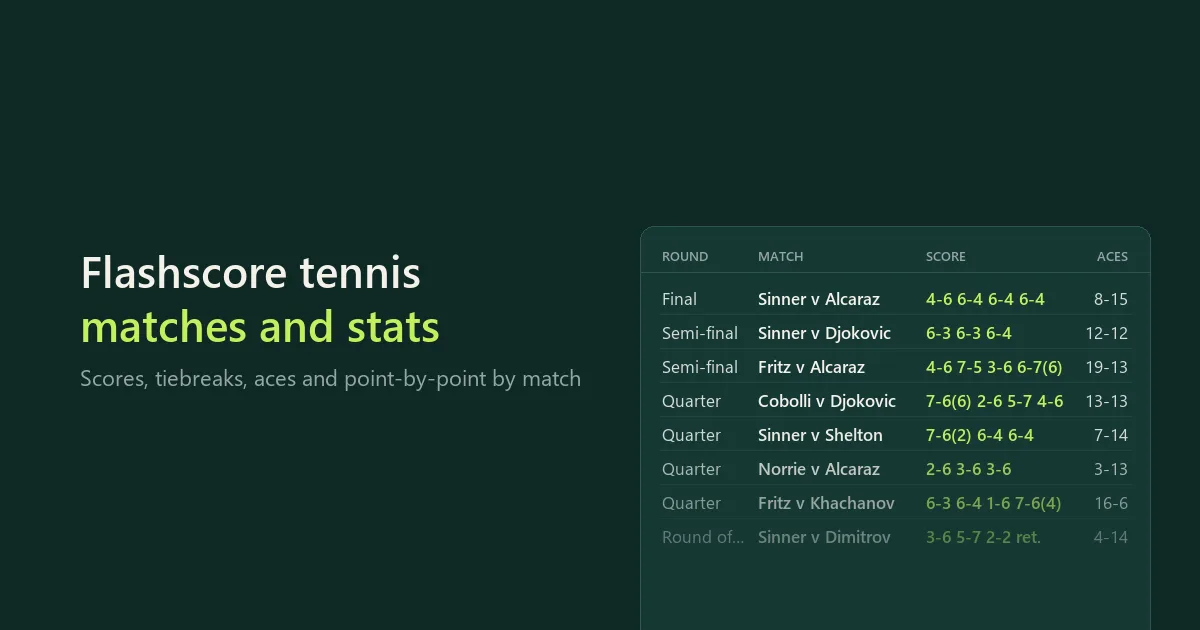
Download tennis match data from Flashscore as CSV, Excel or JSON. Type a tournament or player name, paste a Flashscore link, or leave the list empty to collect matches by day.
Each match comes with the score including tiebreaks, the round and an exact status. Optional extras:
- match statistics with counts
- set durations and the umpire
- point-by-point
- recent form and head-to-head
It is built for people who model, analyse or write about tennis. The numbers keep their counts ("58 of 80 first-serve points won"), and every row says what Flashscore had for that match. Nothing is filled in by guesswork.
No Flashscore account, cookies, proxy or API key is needed. This is an independent tool, maintained by CleanScrape.
Start with a small run
The form opens with Wimbledon 2025 and a maximum of 20 matches, which gives the latest rounds of the first draw (the men's singles, from the final back) with statistics. Start it as it is to see the output, then raise the maximum for both full draws or change the list.
- In Tournaments, players or matches, type what you want, one per line. Leave it empty to collect by day.
- If the list is empty, pick the Days.
- Set Maximum matches and start the run. With several lines, the maximum is shared evenly between them.
The matches are in the run's dataset; download it as CSV, Excel or JSON. Use JSON when you need the nested data (per-set statistics, point-by-point, form lists).
What you can type
| You type | You get |
|---|---|
Wimbledon 2025 | The 2025 men's and women's singles draws, including qualifying |
Wimbledon | The latest edition. Set Editions per tournament to 5 for the last five years |
US Open women 2024, Australian Open doubles, Wimbledon juniors | Just those draws |
Sinner, Swiatek 2025 | The player's matches, newest first, or only that year |
| A Flashscore link | The tournament, player or match it points to. Any page of it works (results, draw, summary), from any Flashscore site, with or without https |
A match ID such as Glwf9adK | That match |
Common names work too: Roland Garros finds the French Open and ATP Finals finds Turin. The SUMMARY record in the run's key-value store shows how each line was read, for example "Wimbledon 2025" was read as ATP Wimbledon 2025, WTA Wimbledon 2025. If a name is unclear, the summary says so and nothing unrelated is collected. Paste the Flashscore link in that case.
Collect by day
Leave the list empty and choose Days: yesterday, today, tomorrow, the last or next 3 or 7 days, or custom dates. Flashscore's daily lists go 7 days back and 7 days ahead (UTC). For anything older, add the tournament or player to the list.
Tours, Match type and Match status narrow the days. The defaults are ATP and WTA, singles and finished matches. Tours also decide which draws a tournament name gives you. A pasted tournament link, a player or a match link is not limited by tour.
A daily schedule with Days set to yesterday keeps a results table up to date; each run is one day of matches.
Examples
Yesterday's ATP and WTA singles with statistics:
{ "dayRange": "yesterday", "maxResults": 100 }
The last five Wimbledon editions, men and women:
{ "targets": ["Wimbledon"], "seasons": 5, "maxResults": 3000 }
A player's 2026 matches with point-by-point:
{ "targets": ["Sinner 2026"], "pointByPoint": true, "maxResults": 200 }
Upcoming matches with form and head-to-head:
{
  "dayRange": "next-3-days",
  "statuses": ["scheduled"],
  "statistics": false,
  "setDetails": false,
  "formAndH2H": true
}
What each match contains
| Column | Meaning |
|---|---|
| Start (UTC), Status | Scheduled start in UTC. Status is finished, retired, walkover, scheduled, live, cancelled, postponed, interrupted, abandoned or awarded |
| Tour, Type, Tournament, Country, Surface, Round, Qualifying, Season | Event details. Round is, for example, Final or 1/16-finals; qualifying rounds start with Qualification |
| Home player, Away player | As listed by Flashscore. Doubles show both names and have partner columns |
| Winner, Sets won (home/away), Score | The home player comes first in the score. A tiebreak score in brackets is the points of the player who lost the set: 7-6(5) 6-7(5) 6-2. Retirements end with ret., walkovers show w/o |
| Sets (JSON) | Games, tiebreak points and duration for each set |
| Duration (min), Umpire | Match duration and the chair umpire, when Set durations and umpire is on |
| IDs and links | Match, player and tournament IDs and links. Keep ID columns as text in spreadsheets |
| Coverage notes | What was not available for this match, in plain words |
Statistics (Match statistics on)
Each statistic has a home and an away column. Ratios keep both numbers, so firstServePointsWonHome = 58 and firstServePointsPlayedHome = 80.
- Service: aces, double faults, first serve in (%), first-serve and second-serve points won and played, break points saved and faced.
- Return: first-return and second-return points won and played, break points converted and opportunities.
- Points and games: service, return and total points; service, return and total games.
- Bigger events also have: winners, unforced errors, net points, average first and second serve speed (km/h) and distance covered (m).
The same statistics for each set are in setStatistics. statisticsLevel is full, basic (only a couple of counters) or none.
Point-by-point (optional)
For every set, each game has its server, its winner, whether serve was broken, and every point score. Points that were break points, set points or match points are marked. Tiebreaks are listed point by point with the server of each point.
Form and head-to-head (optional)
- Head-to-head matches and the win count for each side. Each earlier meeting's sets are given from the current match's sides, so
2-1means the home player won two sets. - Each player's latest matches, overall and on the current surface: date, tournament, opponent, result and score.
- Summary columns (
homeFormWonofhomeFormPlayedand so on) for quick filtering.
Form lists are Flashscore's latest lists at collection time. For a past match they can include matches played after it.
Coverage
What Flashscore publishes depends on the event, season and individual match. This table describes typical coverage, not a guarantee that every match has every field:
| Event | Score and status | Statistics | Point-by-point | Form and H2H |
|---|---|---|---|---|
| ATP, WTA, Challenger, Grand Slams | Yes | Full | Yes | Yes |
| ITF | Yes | Usually none or basic | Sometimes | Yes |
| Walkover | Status only | None | None | Yes |
| Scheduled | Start time | After the match | After the match | Yes |
Matches from earlier years keep their details on Flashscore, so tournament and player history comes with statistics too. Round names come from the tournament's own lists. A few events, such as the Laver Cup, have no round names.
Every run saves a SUMMARY record (JSON) in its key-value store: how each line was read, what it returned, how many matches matched your settings, detail coverage, and why the run stopped.
Pricing
$19 a month to rent it, after a 3-day free trial. Cancel at any time; access runs to the end of the month you paid for.
Runs use compute, paid from your Bytewells credit at Bytewells' rates, separately from the rental. No proxy is used. In tests on Bytewells, 20 Wimbledon matches with statistics used $0.0008 of credit, one day of ATP and WTA matches $0.0005, and 104 Roland Garros matches collected in one minute $0.0019.
There is no charge per match, statistic or detail, so daily schedules and whole tournaments cost the same rental.
Use it from the API
The Actor runs through the Bytewells API, which works with Apify's API clients: point the client's base URL at Bytewells (see Bytewells docs) and call cleanscrape/tennis-match-data with an input from the examples above. The matches are in the run's default dataset; SUMMARY is a JSON record in its key-value store.
Common questions
Where can I get tennis match statistics?
This Actor exports them from Flashscore: aces, double faults, serve and return points, break points and more, with the counts behind each percentage. Type a tournament or player name, or collect every match by day.
Which tours are covered?
ATP, WTA, Challenger, ITF, juniors, team events such as the Davis Cup, and exhibitions. Choose them under Tours.
Can I get past seasons?
Yes. Add a year (Wimbledon 2019) or set Editions per tournament to collect several years. Detailed statistics are mostly available for recent seasons.
Does it include betting odds?
No. It collects results, statistics, point-by-point, form and head-to-head.
What does a run cost on top of the rental?
Only the compute it uses, from your Bytewells credit. Test runs used $0.0005 to $0.0019 each.
Good to know
- Times are UTC.
- Live matches are a snapshot at collection time.
- Bookmaker odds are not included.
- The maximum is a limit, not a promise that so many matches exist.
- If Flashscore changes its data feed, the run stops with a clear message instead of saving empty rows.
Support
CleanScrape maintains this Actor and fixes it when Flashscore changes. If something looks wrong, email [email protected] with the run ID and the tournament, player or day affected. Never include API tokens or private data.
Disclaimer
This Actor is an independent tool developed by CleanScrape. It is not affiliated with, endorsed by, or sponsored by Flashscore, the ATP, the WTA or the ITF. Match data comes from Flashscore's public pages. Trademarks belong to their owners and are used only to identify the source.
More tools from CleanScrape
- Google Trends Scraper API for Interest Over Time: search interest over time, by region, related queries and trending searches
- Economic Calendar API for Official Release Dates: release dates and times for CPI, jobs, GDP and central bank decisions in five economies
- Career Page Jobs Scraper for Workday, Greenhouse and Lever: open jobs from company career pages, with salaries and new or closed jobs
- Whatnot Scraper for Listings and Live Shows: Whatnot listings with prices and sellers, live shows, and alerts for new listings
- Whatnot Seller Tracker for Top Sellers and Sales: top Whatnot sellers per category, items sold, sales per day and followers over time
- Google Flights Scraper and Fare Tracker: flight prices, airlines, stops and times for your routes and dates, with only new or cheaper flights
- App Store and Google Play Reviews Scraper: reviews from both app stores in one table, with daily alerts for new low ratings
- Shopify Product Reviews Scraper for Judge.me and Okendo: Judge.me and Okendo reviews from Shopify product, collection or store links
- ATP and WTA Tennis Rankings Scraper: current ATP and WTA singles, doubles and race rankings with points and movement
- Google News Scraper and RSS Feed Reader: Google News searches, sections and publisher feeds, with only new articles on a schedule
- Google Hotels Scraper for Google Travel Hotel Prices: hotel prices and every booking offer for your dates, adults and currency
- Telegram Channel Messages Scraper with Comments: public Telegram channel posts with views, reactions and comments, and only new posts on a schedule
FAQ
- Which tours are covered?
- ATP, WTA, Challenger, ITF, juniors, team events such as the Davis Cup, and exhibitions. Choose them under Tours.
- Can I get past seasons?
- Yes. Add a year (Wimbledon 2019) or set Editions per tournament to collect several years. Detailed statistics are mostly available for recent seasons.
- How do I keep a daily results table?
- Leave the list empty, set Days to yesterday and schedule the run daily. Each run saves one day of matches with the extras you chose.
- Does it include betting odds?
- No. It collects results, statistics, point-by-point, form and head-to-head.
- What does a run cost on top of the rental?
- Only the compute it uses, from your Bytewells credit. Test runs used $0.0005 to $0.0019 each.
Input
Preview of the input form. Rent the Actor to fill it in and start runs from the console.
Fields
targetsType a name or paste a Flashscore link, one per line. For example: Wimbledon 2025, Sinner, Swiatek 2026, US Open women, or a match link. Leave the list empty to collect matches by day instead.
dayRangeAll matches Flashscore lists for these days (UTC), from 7 days back to 7 days ahead.
maxResultsTotal for the run, shared evenly across the lines in your list. Start small to check the output. Fewer matches may be available.
Adjust if needed.
toursUsed for days, and to choose the draws when you type a tournament name (Wimbledon gives the ATP and WTA singles). A pasted tournament link or a player is not limited by tour.
matchTypeUsed for days, players and tournament names. Typing "doubles" with a tournament name also works.
statusesMatch links are always returned. Each saved match shows its exact status.
startDateYour own first day, used with Days on Custom dates or left on Yesterday. Within the last 7 days or the next 7 days (UTC).
endDateOptional. Defaults to the start date.
seasonsFor a tournament without a year: 1 is the latest edition, 5 adds the four before it. With a year (Wimbledon 2024) only that edition is collected.
includeQualifyingQualifying matches are marked in the Qualifying and Round columns.
sinceFor players. Only matches on or after this date. A year after the name (Sinner 2025) also works. Without either, the newest matches come first until Maximum matches is reached.
statisticsAces, double faults, serve and return points with counts, break points and games; for bigger events also winners, unforced errors, net points, serve speed and distance. Per match and per set.
setDetailsDuration of each set and the match, tiebreak points and the chair umpire.
pointByPointEvery game with server and hold or break, and each point with break, set and match points marked. Best exported as JSON.
formAndH2HHead-to-head record and each player's latest matches, overall and on this surface. Most useful before a match.
formMatchesHow many recent matches to include for each player when Form and head-to-head is on.
API
Bytewells speaks the Apify API. Existing integrations keep working: point apify-client at https://bytewells.com/api and use your Bytewells API token (Console → Settings → API access). The Actor ID is cleanscrape/tennis-match-data (or cleanscrape~tennis-match-data in URLs).
JavaScript · apify-client
import { ApifyClient } from 'apify-client';

const client = new ApifyClient({
  token: process.env.BYTEWELLS_TOKEN,
  baseUrl: 'https://bytewells.com/api',
});

const input = {
  "targets": [
    "Wimbledon 2025"
  ],
  "dayRange": "yesterday",
  "maxResults": 20,
  "tours": [
    "atp",
    "wta"
  ],
  "matchType": "singles",
  "statuses": [
    "finished"
  ],
  "seasons": 1,
  "includeQualifying": true,
  "statistics": true,
  "setDetails": true,
  "pointByPoint": false,
  "formAndH2H": false,
  "formMatches": 10
};

const run = await client.actor('cleanscrape/tennis-match-data').call(input);
const { items } = await client.dataset(run.defaultDatasetId).listItems();
console.log(items);
Python · apify-client
import os
from apify_client import ApifyClient

client = ApifyClient(os.environ["BYTEWELLS_TOKEN"], api_url="https://bytewells.com/api")

run_input = {
    "targets": [
        "Wimbledon 2025"
    ],
    "dayRange": "yesterday",
    "maxResults": 20,
    "tours": [
        "atp",
        "wta"
    ],
    "matchType": "singles",
    "statuses": [
        "finished"
    ],
    "seasons": 1,
    "includeQualifying": True,
    "statistics": True,
    "setDetails": True,
    "pointByPoint": False,
    "formAndH2H": False,
    "formMatches": 10
}

run = client.actor("cleanscrape/tennis-match-data").call(run_input=run_input)
items = client.dataset(run["defaultDatasetId"]).list_items().items
print(items)
HTTP · curl
curl -X POST "https://bytewells.com/api/v2/acts/cleanscrape~tennis-match-data/runs" \
  -H "Authorization: Bearer $BYTEWELLS_TOKEN" \
  -H "Content-Type: application/json" \
  -d '{"targets":["Wimbledon 2025"],"dayRange":"yesterday","maxResults":20,"tours":["atp","wta"],"matchType":"singles","statuses":["finished"],"seasons":1,"includeQualifying":true,"statistics":true,"setDetails":true,"pointByPoint":false,"formAndH2H":false,"formMatches":10}'
Runs are billed as compute from your credit balance. Paid Actors need an active rental or trial; otherwise the API answers 402 rental-required.
Related
More Actors from the same publisher.
ATP and WTA Tennis Rankings Scraper
CleanScrape · @cleanscrape
Current ATP and WTA rankings from Flashscore: singles, doubles and the races, with points, movement and country, by player or country.
OtherDeveloper toolsAutomation$12/mo7-day free trial
App Store and Google Play Reviews Scraper
CleanScrape · @cleanscrape
App Store and Google Play reviews in one table, with ratings, text, dates and app versions, plus daily alerts for new low ratings.
Developer toolsMarketingAutomation$12/mo7-day free trial
Economic Calendar API for Official Release Dates
CleanScrape · @cleanscrape
Official release dates and times for CPI, jobs, GDP, retail sales and rate decisions in the US, euro area, UK, Canada and Australia, with watches.
AIAutomationDeveloper tools$19/mo3-day free trial
Google Flights Scraper and Fare Tracker
CleanScrape · @cleanscrape
Scrape Google Flights fares by route and date: prices, airlines, stops, layovers, local times and price level. Track only new or cheaper flights.
AIAutomationDeveloper tools$29/mo3-day free trial
Career Page Jobs Scraper for Workday, Greenhouse and Lever
CleanScrape · @cleanscrape
Scrape jobs from company career pages on Workday, Greenhouse, Lever, Ashby and four more systems, with salaries and new or closed jobs.
AIAutomationJobs$29/mo3-day free trial
Google Hotels Scraper for Google Travel Hotel Prices
CleanScrape · @cleanscrape
Hotel prices from Google Hotels for your dates, adults and currency, with every organic booking-site offer for each hotel.
TravelAutomationDeveloper tools$15/mo7-day free trial